
One of the ways to make your code more robust to unexpected input is to develop with boundary cases in your mind. Test-driven code development begins with writing a set of unit tests for each class. These tests often includes normal and extreme use cases. Thanks to packages like doctest for Python, Mocha and Jasmine for Javascript etc., we can write and test codes with an easy format. In this blog post, I will present a short example of how to get started with doctest in Python. N.B. doctest is best suited for small tests with a few scripts. If you would like to run a system testing, look for some other packages!
Because not all interesting biology is health-related!
Nowadays, biological research science spins around health: Cancer. Neuroscience. Immunology. Pharmacology. And many more health-related areas which are being deeply studied. It seems that everyone is keen to spend their lives looking for the cure of cancer or Alzheimer. What a drag! For this reason (and also to show that research in less popular and less founded sectors can also improve significantly human lives), I have decided to write about something completely different: plant microbiome!
Indeed, I am going to write about bacteria. And no, they are not related to health at all. These bacteria live the soil and infect plants. However, they are not “bad”. Actually, they favour the plant’s growth and development. This is possible thanks to a fascinating process which finishes (ALERT SPOILER!!) with the bacteria transforming the atmospheric nitrogen into ammonia that can be used by the plant (nitrogen fixation).
The process starts with some kind of small talk between Rhizobium (the bacteria) and the legume (the plant): Legumes secrete compounds through their roots that the bacteria living close by can detect. In response to this stimulus, bacteria approach the root hairs of the plant and attach and secrete lipo-chitooligosaccharides known as Nod factors.
It continues with some action: The plants sense the Nod factors, which induce the root hairs curling and trapping the bacteria. The bacteria continue to grow and eventually form an infection thread whose growth allows the bacteria to reach other plant cells.
And it finishes with a happily ever after ending: A structure called a nodule is formed. The bacteria in the nodule form an organelle called the symbiosome, within which the bacteria differentiate to a state called bacteroid. In this stage, the bacteroid fixes nitrogen for the plant.
I know… Everything has happened too fast (the process can take 1 – 2 weeks). And I have not been bothered to explain it in detail so you can enjoy reading this amazing review: https://www.ncbi.nlm.nih.gov/pubmed/23493145
But wait! I almost forget to say why is worth studying this… The point is that plants need nitrogen to grow and they cannot use atmospheric nitrogen. Therefore, the more nitrogen they receive from the bacteria, the more they will grow. Consequently, we may increase the quantity of food available by improving this process.
Turning MD Trajectories into Movies using PyMOL
Putting movies into your presentations is the perfect way to cover up a terrible underlying presentation help the audience visualise the systems you are discussing. Static protein movies can enhance an introduction or help users understand important interactions between proteins and ligands. PyMOL plugins, such as emovie.py, help you move beyond the ‘rock’ and ‘roll’ scenes in PyMOL’s movie tab. But there ends the scope for your static structures.
If you want to take your PyMOL movie making skills to the next level, you should start adding some dynamics data. This allows your audience to visualise how your protein dynamics evolve over time and a much easier way to explain your results (because, who likes 10,000 graphs in a presentation!? Even if your R plots look super swish.). For example: understanding binding events, PPIs over time or even loop motion.
The following tutorial shows you how to turn a static PDB structure into a dynamic one, by adding a GROMACS trajectory. Most of the commands you will encounter while making a static structure movie, so should not be too alien.
Vim and I
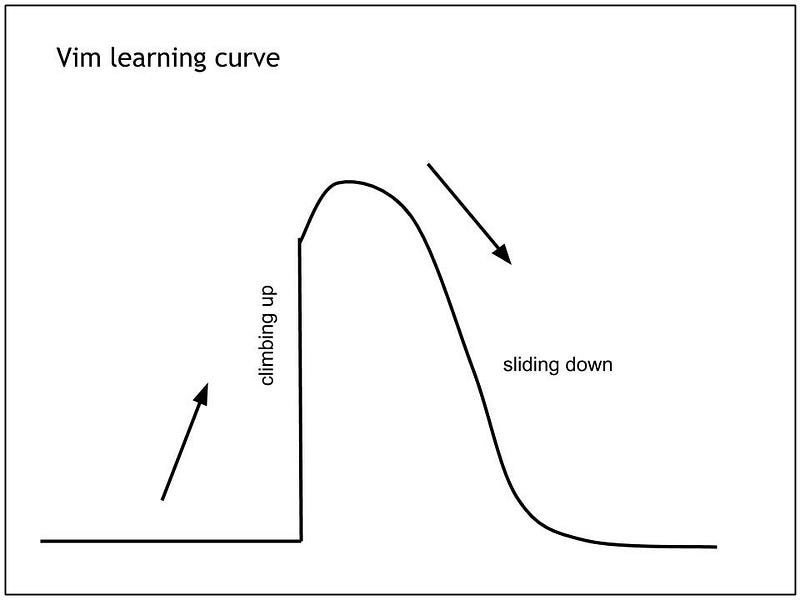
Vim is great. Despite its steep learning curve , it has many advantages and many loyal Vim followers will tell you that you should force yourself to use it.
Personally I started using Vim when I was ssh-ing into the group servers or into my computer in department. In such scenarios, I could not open the IDEs with the nice GUIs 🙁 However, as time passed, Vim started to grow on me. Now, I can list a few reasons why I think it is great, for example, it requires a small amount of memory to run, has a short start up time and can handle large files pretty well.
Although, I am definitely not a Vim expert, I will tell you about some of the things I have added to my .vimrc. The .vimrc file is very handy for containing all your favourite settings, such as key mappings, custom commands, formatting and syntax highlighting. The file uses vimscript which is a programming language in itself. However, there is a lot of help online that tells you with what lines to add to your .vimrc. I would recommend installing Vundle which is a Vim plugin manager.
Here I will list some cool things that I have discovered you can do with your .vimrc. It has certainly made my life a bit nicer.
- Code Folding
Most IDEs provide a way to collapse functions and classes that results in only seeing the function/class definition and hiding the code. To do this in Vim add the following lines to your.vimrc" Enable folding set foldmethod=indent set foldlevel=99 " Enable folding with the spacebar nnoremap <space> za
Alternatively, you can install the Vim plugin SimpylFold. - Python indentation
Vim does not do auto indention like many IDEs. To automatically do PEP-8 indentation for Python, add the following to your .vimrc .
" PEP indentation
au BufNewFile,BufRead *.py
\ set tabstop=4
\ set softtabstop=4
\ set shiftwidth=4
\ set textwidth=79
\ set expandtab
\ set autoindent
\ set fileformat=unix
You can also install the Vim plugin vim-flake8 which is a static syntax and style checker for Python source code. It shows errors in a quickfix window and lets you jump to their location inside your code.
- Turn line numbers on
Rather than typing in:set nu
every time you open your files. You can always have them turned on by adding :set nu to your.vimrc - Autocompletion
When I switch from PyCharm to Vim I feel a bit lost without the autocompletion however, after a quick search I found many are using the Vim package Youcompleteme and it is awesome.
Exciting new studies in OAS
Hi everyone!
Today is the day for another blog post from me. Here, I would like to give you an update on new studies, which were deposited in the Observed Antibody Space (OAS) resource and take a closer look at one of these studies. To date, we have curated 57 studies in OAS, where we provide raw nucleotide and numbered amino acid sequences for download. These amino acid sequences have been filtered using ANARCI parsing, which ensures that the sequences align to respective species HMM profiles and do not have unusual indels and frameshifts. More than 660 million numbered amino acid sequences are deposited in OAS, where every sequence keeps a link to its corresponding nucleotide sequence. Recently we added two more studies to OAS: Sheng et al., (2017) and Setliff et al., (2018). We numbered roughly 2.8 and 46 million sequences in Sheng et al., and Setliff et al., studies respectively. In this blog post, I would like to talk more about the uniqueness of Setliff et al., data.
Finding the lowest energy conformation of given molecule!
Generating low-energy molecular conformers is important for many areas of computational chemistry, molecular modeling and cheminformatics. Many tools have been developed to generate conformers, including BALLOON (1), Confab (2), FROG2 (3), MOE (4), OMEGA (5) and RDKit (6). The search algorithm implemented in these tools can be broadly classified as either systematic or stochastic. These algorithms primarily focus on generating geometrically diverse low-energy conformers. Here, we are interested in finding lowest energy conformation of a molecule instead of achieving geometric diversity and Bayesian optimization is used to find the lowest energy conformation (7). Continue reading
Check My Blob
A brief overview and discussion of: Automatic recognition of ligands in electron density by machine learning .This paper aims to reduce the bias of crystallographers fitting ligands into electron density for protein ligand complexes. The authors train a supervised machine learning model using known ligand sites across the whole protein databank, to produce a classifier that can identify which common ligands could fit to that electron density.
OPIG Putts Up
Tonight, post-OPIG Group Meeting, most of us visited the local crazy golf course “Junkyard Golf” for some serious fun. Three groups of us teed off at different times, negotiating dimly lit Heath-Robinson/Rube Goldberg-style courses leading into bathtubs, past bears and through volcanoes. We’re not competitive at all (Serenity & Crunch) so it was a great surprise to learn at the end of our games that CW had won…

What can you do with the OPIG Antibody Suite?
OPIG has now developed a whole range of tools for antibody analysis. I thought it might be helpful to summarise all the different tools we are maintaining (some of which are brand new, and some are not hosted at opig.stats), and what they are useful for.
Immunoglobulin Gene Sequencing (Ig-Seq/NGS) Data Analysis
1. OAS
Link: http://antibodymap.org/
Required Input: N/A (Database)
Paper: http://www.jimmunol.org/content/201/8/2502
OAS (Observed Antibody Space) is a quality-filtered, consistently-annotated database of all of the publicly available next generation sequencing (NGS) data of antibodies. Here you can:
docopt for dummies
Parsing command line arguments is an annoying piece of boilerplate we all have to do. Documenting our code is either an absolutely essential part of software engineering, or a frivolous waste of research time, depending on who you ask. But what if I told you that we can combine the two? That you can handle your argument parsing simply by documenting how your code works? Well, the dream is now reality. Continue reading